

Description
[ad_1]

Pinterest mendorong lebih banyak lalu lintas daripada gabungan Google+, YouTube, dan LinkedIn. Inilah sebabnya mengapa kami mengkodekan plugin ini yang akan menyematkan gambar dari posting Anda secara otomatis ke pinterest.com.
Cukup instal dan lupakan akun Pinterest Anda karena Pinterest Otomatis akan melakukan semua pekerjaan penyematan untuk Anda.

Fitur Utama
Sematkan jumlah gambar yang tidak terbatas: Pinterest Otomatis dapat menyematkan dari satu gambar ke semua gambar dari kiriman langsung ke akun Pinterest Anda.
Pin massal: Postingan dapat diantrekan untuk disematkan secara massal. Pilih posting yang diinginkan, dan plugin akan menyematkannya satu per satu sesuai dengan jadwal yang ditentukan. Jumlah gambar untuk disematkan per posting dapat diatur dari satu ke semua.
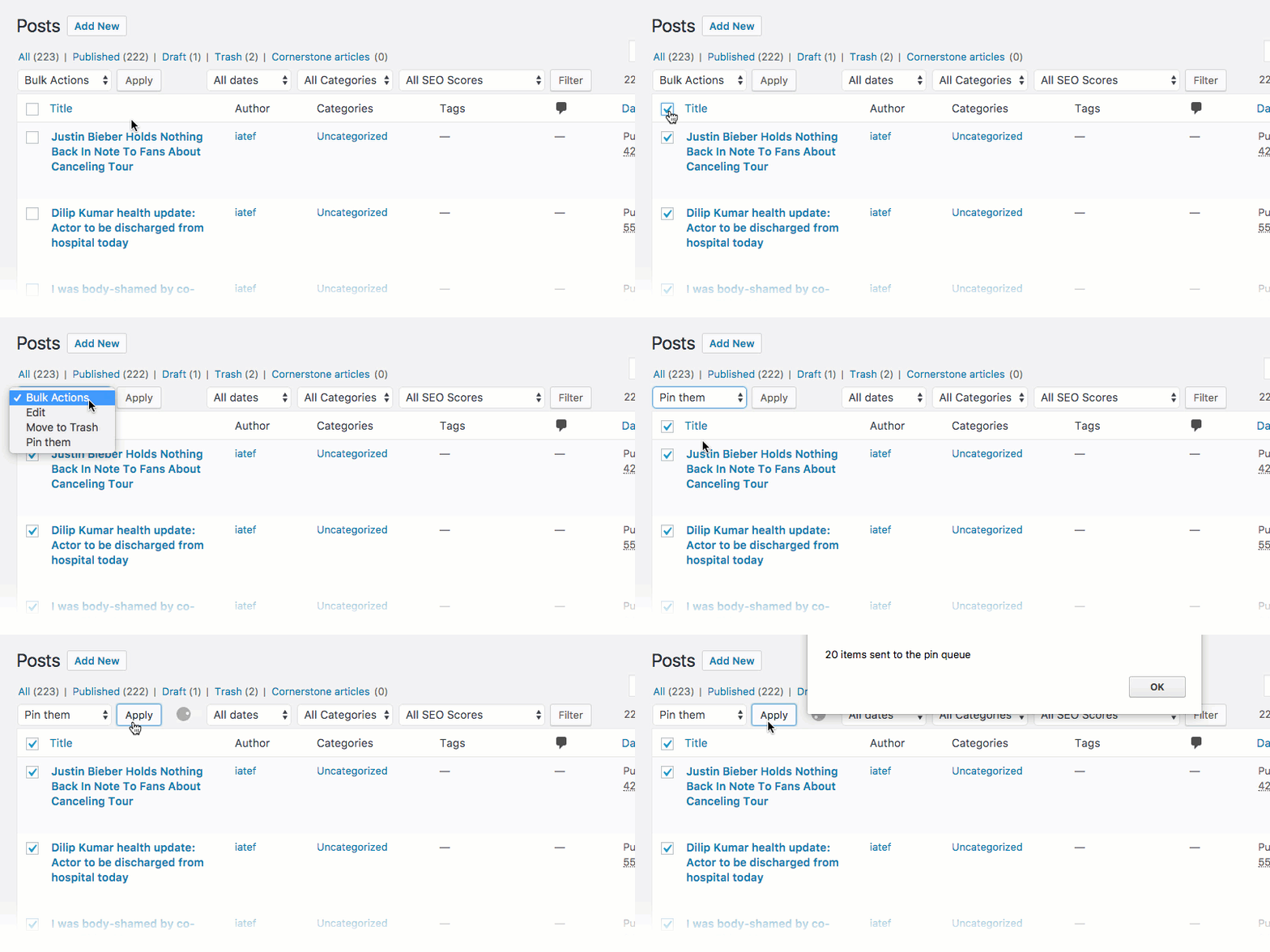
Deteksi Gambar Otomatis: Pinterest Otomatis mendeteksi gambar dari kiriman Anda, lalu mencantumkannya, tempat Anda dapat memutuskan gambar mana yang harus disematkan.
Deteksi papan otomatis: Pinterest Otomatis akan mendeteksi papan secara otomatis di akun Pinterest Anda sehingga Anda dapat memilih papan mana yang ingin Anda sematkan gambar.
Sistem antrian: Plugin mengantre gambar yang memenuhi syarat untuk disematkan dalam antrean dan menyematkannya dipisahkan oleh interval acak. Itu memungkinkan penyematan gambar dalam jumlah tak terbatas tanpa masalah.
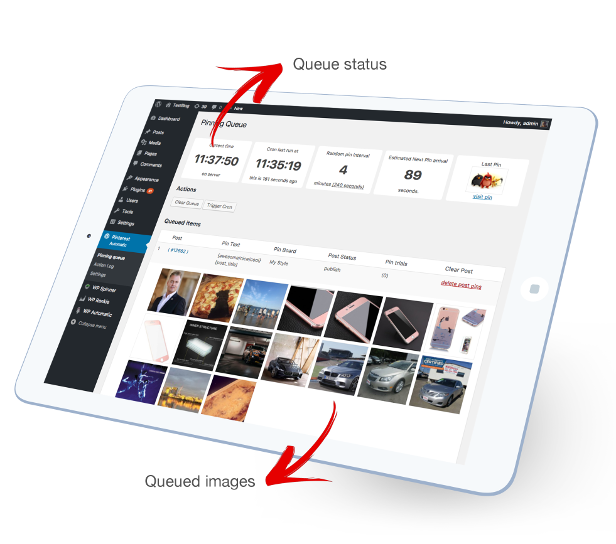
Tautan otomatis pin ke postingan Anda: Semua pin secara langsung di-hyperlink ke postingan Anda, jadi begitu pengguna Pinterest mengklik pin, itu akan mengarahkannya ke postingan Anda di situs Anda. Tautan pin masih bisa berupa tautan tetap atau tautan dari bidang khusus. Gambar juga dapat diunggah tanpa tautan balik seperti gambar yang diunggah dari komputer.
Teks pin default dan papan pin: Anda dapat mengatur teks pin default atau pinboard default tempat semua pin akan disematkan, sehingga Anda tidak perlu memasukkan teks setiap saat
Tag yang didukung : 9 Tag dapat digunakan dalam teks pin, di mana setiap tag akan diganti dengan nilai yang setara dari posting yang disematkan
- [image_alt] : diganti dengan teks alt gambar
- [post_title] : ganti judul postingan
- [post_tags] : diganti dengan tag pos setelah mengubahnya menjadi tag hash pinterest
- [post_excerpt] : diganti dengan kutipan pos
- [post_link] : diganti dengan tautan pos
- [post_author] : diganti dengan penulis posting
- [post_category] : diganti dengan kategori posting
- [product_price] : diganti dengan harga produk WooCommerce
- [customFieldName] : diganti dengan nilai bidang khusus
Dukungan jenis posting khusus : jika Anda memiliki portofolio atau galeri atau jenis posting apa pun, maka Pinterest otomatis mendukungnya
Dukungan WooCommerce : jika Anda memiliki situs web berbasis eCommerce atau WooCommerce WordPress, maka Pinterest Otomatis dapat menyematkan produk mereka ke Pinterest
Dukungan bot : Pinterest Otomatis dapat menyematkan posting bot seperti posting dari WordPress Otomatis. Itu dapat menyematkan gambar unggulan, sejumlah gambar tertentu atau semua gambar dari setiap posting.
Dukungan gambar bidang khusus: jika Anda memiliki URL gambar yang disimpan di bidang khusus, Anda dapat memberi tahu plugin untuk menyematkan gambar dari bidang khusus itu
Deteksi gambar untuk disematkan dari ujung depan: jika gambar Anda tidak muncul di bagian belakang, Pinterest Otomatis masih dapat mendeteksinya dari bagian depan. misalnya, beberapa galeri ditampilkan menggunakan kode pendek di backend.
Sematkan gambar WordPress berukuran penuh dari thumbnail : Pinterest otomatis memeriksa apakah gambar berukuran penuh tersedia untuk disematkan, bukan gambar mini.
Kategori WordPress khusus untuk dukungan papan Pinterest: Anda dapat mengatur papan mana, gambar akan disematkan sesuai dengan kategorinya. Tetapkan jumlah kategori yang tidak terbatas ke aturan papan *Perhatikan bahwa, gambar hanya akan masuk ke satu papan.
Tag WordPress khusus untuk dukungan papan Pinterest : Anda dapat mengatur papan gambar yang akan disematkan sesuai dengan tagnya.
Pemilih jQuery khusus: Jika gambar tidak terletak di editor dan terlihat di tempat lain pada halaman pengeditan, pemilih jQuery khusus dapat diatur yang dapat digunakan oleh plugin untuk mengambil gambar.
Taksonomi Kustom: Di bagian kategori ke papan, Plugin dapat mencantumkan kategori dari taksonomi khusus.
Spintax diaktifkan : Form Spintax dapat digunakan untuk pin text seperti {awesome|cool|nice}, hanya satu kata yang akan dipilih secara acak untuk setiap pin
Posting gambar unggulan sebagai pin:Plugin dapat menyematkan gambar unggulan ke Pinterest.
Dukungan posting terjadwal: Pilih gambar yang akan disematkan dan setelah postingan terjadwal Anda dipublikasikan, postingan tersebut akan disematkan.
tugas cron : Plugin dapat menggunakan pekerjaan cron wordpress internal dan pekerjaan cron khusus dapat digunakan juga.
Tampilkan hanya opsi untuk administrator : Plugin memiliki opsi untuk hanya ditampilkan untuk administrator.
Dukungan proxy : Pinterest atuomatic dapat menggunakan proxy untuk terhubung ke Pinterest.
Kategori yang dikecualikan : Pinterest atuomatic dapat mengecualikan pos agar tidak disematkan jika berada dalam kategori tertentu.
Pembuatan kutipan otomatis : Pinterest Atuomatic dapat secara otomatis menghasilkan kutipan secara otomatis dari konten Anda dengan panjang karakter yang telah ditentukan sebelumnya.
Kecualikan gambar kecil : Pinterest Atuomatic dapat mengecualikan gambar yang lebih kecil dari lebar tertentu agar tidak disematkan.
Lewati duplikat : Ada opsi untuk melewatkan menyematkan gambar yang sama dari pos yang sama dua kali
Kecualikan menurut kategori : Pinterest Otomatis dapat melewati penyematan dari kategori yang Anda tetapkan
Kecualikan gambar yang mengandung teks tertentu : Anda dapat mengatur teks tertentu jika ditemukan di URL gambar yang disematkan, itu akan dikecualikan dari penyematan
Nomor tag yang fleksibel : Pinterest atuomatic dapat menyertakan tag posting sebagai hashtag Pinterest dalam deskripsi pin. Itu juga dapat memilih sejumlah tag tertentu untuk disertakan
Cari dan ganti di tautan src gambar, tautan pin, atau tag pin : Anda dapat mengganti bagian tertentu dengan yang lain dalam nilai akhir yang dikirim ke Pinterest.
Interval pin acak : Anda dapat mengatur interval pin acak antara pin mulai dari 3 menit. Plugin akan menyematkan gambar dengan interval acak di antara mereka.
Filter visibilitas plugin : Anda dapat mengatur plugin agar terlihat hanya untuk admin.
Tambahkan parameter secara otomatis ke tautan pin : Plugin dapat secara otomatis menambahkan parameter yang telah ditentukan sebelumnya ke tautan pin untuk tujuan pelacakan
Pembaruan otomatis : Plugin dapat diperbarui langsung dari dashboard wordpress.
Log tindakan terperinci : Log tindakan yang diperbarui secara otomatis yang merinci setiap tindakan yang dilakukan oleh plugin



Version 4.14.4 (23 August 2021)
- Fix: Urgent core bug fix, all users must upgrade

Version 4.14.3 (2 May 2021)
- Fix: WPBakery JS composer integration updated

Version 4.14.2 (14 August 2020)
- Fix: Plugin updated to work with WordPress 5.5

Version 4.14.1 (27 December 2019)
 - Fix: fetch boards now works again without the need to reload the page

Version 4.14.0 (15 November 2019)
 - Urgent: Fetch boards back to work after a recent Pinterest change
 - NEW: option to set pin link as the attachment image link
 - NEW: Search and replace in link now supports regular expressions
 - NEW: Pin link points to now accepts multiple links comma separated
 - Fix: Polylang integration back to work

Version 4.13.0 (17 August 2019)
 - NEW: Additional queue processing interval
 - NEW: PolyLang plugin support
 - Improved: Pin URL from a custom field now can detect URLs inside Arrays
 - Fix: Titles with new lines/carriage return was showing 404 error, now sorted

Version 4.12.3 (17 July 2019)
 - Fix: Now detects all images from WP Automatic eBay/Amazon posts
 - Fix: Titles with new lines/carriage return was showing 404 error, now sorted

Version 4.12.2 (21 June 2019)
 - Urgent: Code updated to cope with new Pinterest changes
 - NEW: SOCK5 proxies support

Version 4.12.1 (12 June 2019)
 - Fix: Check more text now returned to the pin description
 - Fix: remove extra spaces/carriage returns from added proxies

Version 4.12.0 (6 May 2019)
 - NEW: added support for fooGalleries plugin
 - Fix: Excerpt auto generation for non-latin chars now works correctly
Fix: Title trim for non-latin chars now works correctly

Version 4.11.2 (21 April 2019)
 - Fix: tags as hashtags now works for queued pins
 - Fix: Queue now displays correct pin text

Version 4.11.1 (13 April 2019)
 - NEW: option for the pin title
 - Improved: capture images uploaded option now gets the image alt
 - Fix: tags as hashtags now back to work
 - Fix: blob images when uploading now get skipped

Version 4.11.0 (10 April 2019)
 - NEW: option to capture images uploaded to the post even if not visible in the admin area
 - NEW: option to skip images lower than a specific height
 - Fix:  post_tags now only consider added tags taxonomies added to the plugin settings
 - Fix: image from the custom field now work when the option to skip the featured image
 - Fix: Checked images now display pending icon when clicking publish using the block editor

Version 4.10.4 (14 Mar 2019)
- NEW: Queue button to reset the update interval and force cron trigger
- Fix: Proxies now back to work

Version 4.10.3 (6 Mar 2019)
- Urgent: Code updated to cope with a new change from Pinterest that stopped fetching
- NEW: Sections support, fetch boards button now returns the sections
- NEW: page break support so images from multi-page posts now get pinned
- Improved: The plugin can now revert to the default board if the selected board was deleted

Version 4.10.2 (9 January 2019)
- Urgent: Code updated to cope with a recent Pinterest change that  removed the cookie
- New: description new tags  product_cat, product_categories, post_categories
- Fix: Correct pin link now get reported to the plugin log/queue page

Version 4.10.1 (21 November 2018)
- Fix: the recent version of Yoast SEO conflicted with the plugin UI. now sorted

Version 4.10.0 (28 October 2018)
- NEW: option to skip queuing already pinned images from the same post
- Improved: Now displays a notice if the queue processing time was configured improperly
- Improved: Now the plugin can detect images after next page tags when bulk pinning
- Fix: post_excerpt tag now removes the shortcodes
- Fix: successful pin link in log page now is correct

Version 4.9.0 (22 September 2018)
- NEW: Gutenberg support
- NEW: WooCommerce product attributes can now be added to the pin description
- Fix: Idle time is now 1 hour

Version 4.8.0 (02 September 2018)
- NEW: Complete random a new option to post randomly from the queue
- NEW: option to skip images from bulk pinning if the image URL contains a specific word
- NEW: option to skip the featured image from pinning
- NEW: Alternate cron command was added
- NEW: Now the     queue feature can detect images coming from shortcodes
- Fix: Auto check first image now works for all post types
- Fix: Code updated to cope with a minor change from the Pinterest side
- Improved: exclusion rules now get applied to the featured image as well

Version 4.7.0 (10 March 2018)
- Change: Now the plugin does not require a username and a password, but a cookie session.
- Fix: Parse front-end now supports the "more" tags.
- Fix: image alt text for gallery images now gets captured

Version 4.6.1 (14 November 2017)
- NEW: new tag [post_category]
- Fix: conflict with divi icon sorted.
- Fix: [post_tags] back to work

Version 4.6.0 (10 October 2017)
- NEW: Custom fields support in pin text
- Fix: Pin text now supports quotes

Version 4.5.2 (26 August 2017)
- Fix: recent Pinterest change resulted in boards not found issue now sorted
- Fix - failed to be pinned images now gets automatically removed

Version 4.5.0 (5 August 2017)
- NEW: option for the number of images to pin when added to the queue & auto pinned
- NEW: excluded categories
- NEW: Now captures the images from the text editor
- NEW: option to exclude small images from being pinned
- NEW: option to limit the number of tags added to the pin text
- NEW: option to set pin link from a custom field or a fixed link
- improvement: log and queue page now stop updating when not active
- fix: log page now auto updates

Version:4.4.0 (18 April 2017)
- NEW: PHP 7 compatible
- NEW: All in one SEO pack plugin compatibility.[post_excerpt] tag for SEO description
- NEW: option to skip checking if a full sized image exists
- NEW: option to add additional parameters to the pin link
- Fix: Recent Pinterest changes made the previous version login not work. now sorted
- Fix: Spintax class renamed to remove any conflict with other plugins
- Fix: at some cases the plugin pinning images although the idle option is active now fixed
- Fix: proxy now gets trimmed removing any extra white space that may cause a proxy issue.

Version:4.3.1 (6 September 2016)
- Fix: Recent Pinterest change made the plugin no more display the username fixed.

Version:4.3.0 (3 July 2016)
- NEW: Thrive content builder integration so use parse front-end for images
- New: option to upload images with no link back to the source by default
- Fix: Empty src images now get skipped
- Fix: Now pre_get_posts filters get removed as some plugins were excluding posts
- Fix: 401 unauthorized reply from Pinterest now makes the plugin reauthorize itself
- Fix: Plugin now displays the username extracted after login at the log page

 Version:4.2.2 (7 May 2016)
- Fix: Recent Pinterest change stopped pinning from non-us servers now handled.

Version:4.2.1 (10 April 2016)
- Fix: Pin link at the plugin log page now works after a recent Pinterest change

Version:4.2.0 (15 March 2016)
- Fix: Plugin recoded to work with major recent Pinterest changes
- Fix: Now shortcodes get skipped manually if it was not stripped using wp
- Update: now the plugin truncates description to 450 instead of 500

Version:4.1.2 (6 Feb 2016)
- New: product_price tag for the woo-commerce price to be posted to Pinterest
- NEW: justified image grid full image extraction from thumbnails
- Fix: Tags to board, Category to board rewritten to work for wp 4.4.x
- Fix: the warning from the plugin updater now fixed

Version:4.1.0 (19 January 2016)
- NEW: PressThis support added so now the plugin detect pressThis posts
- Fix: Truncate the post content if it's size is over 500 chars which is Pinterest limit
- Fix: If a draft post got published, it now doesn't get pinned twice
- Fix: trim title to chars option empty posts were getting created with the title "..." fixed
- Fix: Full sized image check now works with CloudFlare hotlinking disabled

Version:4.0.5 (20 APRIL 2015)
- NEW: Visual composer compatibility out of the box
- Fix: bug fix that verifies the existence of the original image was returning always true
- Improved: Fetch boards link updated to use the back-end ajax URL
- NEW: Auto delete old log records freeing the database

Version:4.0.5 (20 APRIL 2015)
- Code update: updated to cope with recent Pinterest changes
- Fix: queue stop fixed for some users
- Fix: false items appeared in the queue now fixed

Version:4.0.4 (10 March 2015)
- Fix: | character now can be added to pin text without problem
- Security improvements

Version:4.0.3 (1 March 2015)
- Fix: Recent Pinterest change stopped the plugin from functioning sorted.
- Fix: curl follow location with full sized image existence  check now used
- Fix: pin them button now appears only in supported post types
- NEW: Queue processing time  from to

Version:4.0.2 (11 NOV 2014)
- Fix : some users get license deactivated automatically now fixed

Version:4.0.1 (29 October 2014)
- New: Remove pinned image from queue instantly via ajax
- New: Search and replace texts for URL
- Fix: Recent Pinterest change in boards fetching now updated to work for all users
- Fix: Detect image from the front end now works for all post types
- Fix: added new option to add all to the queue

Version:4.0.0 (15 October 2014)
- NEW: Tags to board so you can now point posts with a specific tag to a specific board
- NEW: Remove single post/pin from the queue
- NEW: Responsive pinning queue which fits all screen sizes
- NEW: Trigger cron via ajax by clicking run now
- NEW: Auto clear log so you can set how many days log should be kept in DB
- UI Improvements: Queue was rewritten to auto-update its items via ajax
- UI Improvements: WordPress timezone considered before the plugin was using UTC time
- UI Improvements: log rewritten to auto updates it's items via ajax
- UI Improvements: Now you can see what was the last pin and visit it
- UI Improvements: New plugin icon with unicolor
- Improvements: One request pin so the plugin can pin an image with just one call
- Improvements: Now the cron cannot be triggered twice at the same time
- Fix: Image src with + char in it was not pinned URL now get posted encoded
- Fix: Some users get login failed due to recent Pinterest change now fixed

Version:3.3.0 (3 September 2014)
- Fix: Recent Pinterest changes were generating weird chars at log now updated
- Fix: new lines in pin text was giving an error of invalid content. now fixed
- Fix: special characters at pin text were posting HTML chars like #am p now fixed
- Fix : [post_link] tag now shows the permalink instead of guid
- Fix: HTML tags stripping with post_excerpt and content before posting
- Fix: categories parent-child now hierarchical in settings category to page option
- NEW: Proxy support: now users with blocked IP from Pinterest can use proxies
- NEW: images that are only visible via front-end can pin like shortcode generated images
- NEW: Full image now get extracted and posted from resized image
- NEW: Automatic updates support: now you will be able to automatically update the plugin
- NEW: Pinterest password is not shown as plain text in settings
- NEW: Auto excerpt generation
- NEW: Remove single item from the queue or single post support
- NEW: Auto update pin alt

Version:3.2.0
- Fix: gallery images pinned as thumbnails 150X150 px now pins the full sized image.
- Fix : [post_tags] tag was not returning tags for custom post types. now it does.
- Fix : 3 minutes interval for pins were not accepted by the plugin it accepts it like 3-4
- Fix: some pinned image was getting auto checked.
- New: next pin arrival time added
- New: old support widget updated with opt-in removal and button to hide

Version:3.1.0 (28 June 2014)
- New: now you can reset the queue any time just visit the queue and click "Clear"
- New: Cron interval: now you can set random value for pinning the items from the queue
- Fix: TinyMCE editor separator caused an empty image in the pin box now sorted
- Fix: Main class was named Pinterest. class name changed.
- URGENT Fix: Pinterest changes something that made the plugin stop working as expected.

Version:3.0.1 (20 MAY 2014)
- URGENT Fix: Pinterest changes something that made the plugin stop working. sorted

Version:3.0.0 (25 FEB 2014)
- New: bulk pin option to select posts and pin them
- New: Category to board section to set image board according to the category
- New: Queuing system where one image get pinned every minute from the queue
- New: Custom field support where the plugin can now post from a custom field
- New: Custom taxonomies to list categories from in the category to board section
- New: added a Cron job
- New: select all option to select all images at once
- New: custom jquery selector for listing images from
- New: instant update pin icon
- Added: license verification

Version:2.0.4 (23  JAN 2014)
- bug fix: a recent bug fixed that made the plugin give an error when pinning.

Version:2.0.3 (16  JAN 2014)
- Fix: recent Pinterest change made the plugin get boards names as "undefined". Sorted.

Version:2.0.2 (27  OCT 2013)
- code update: fetch boards fixed after stopping work as Pinterest changed and plugin.

Version:2.0.1 (30  September 2013)
- Fix: code updated to work with a recent Pinterest change
- Fix: Special characters in the title no more generate an internal server error
- Fix: already pinned featured image now marked as pinned

Version:2.0.0 (18  September 2013)
- New: Custom post types support
- New: Bot posts support
- New: WordPress e-commerce support
- New: Custom post types support
- New: Pinned images now marked as pinned
- New: New pin text tags [image_alt],[post_content],[post_excerpt],[post_link],[post_author]
- Improvement: log is now more handy and informative
- Improvement: curl exisit check added
- Improvement: plugin 'wp pinner' conflict exisit check added

Version:1.4.2 (21  July 2013)
- code update: Pinterest changed and plugin updated to work with the latest change.

Version:1.4.1(2  July 2013)
- Bug Fix: Pinterest changed its login form. plugin updated

Version:1.4.0 (6 June 2013)
- New Feature: option added for auto-checking the first image for being pinned.
- New Pinterest look support. old look no more supported

Version:1.3.1 (4 MAY 2013)
- plugin now compatible with the Pinterest new look (old look no more supported)

Version:1.2.4 (8 JAN 2013)
- plugin now compatible with the last version of WordPress 3.5

Version:1.2.0 (25 APR 2012)
- Post featured image option addition
- Scheduled post support

Version:1.0.1 (25 APR 2012)
- Update Boards issue fix

[ad_2]
Source